Posts

Showing posts with the label Grouping

subtemplating

Image
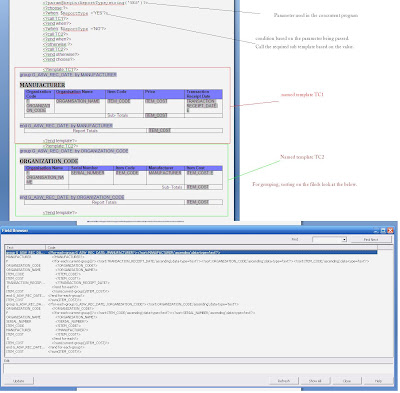
Have a look at this, just adding sub template and calling them based on the concurrent program parameter. <?param@begin:ReportType;string(‘YS’)?> <?choose:?> <?when: $ReportType =’YES’?> <?call:TC1?> <?end when?> <?when: $ReportType =’NO’?> <?call:TC2?> <?end when?> <?otherwise:?> <?call:TC2?> <?end otherwise?> <?end choose?> Run with ReportType as NO or other than YES. You should get the result as follows Run with ReportType YES. You should get the result as follows

Sum rows in RTF Template

Image
Grouping and transforming is fun, One more question on forum Asking for Grouping differently.. This is normal grouping Output Product Name |Sales ------------------------|-------- Product A |50 ------------------------|-------- Product B |100 ------------------------|--------- Product B1 |100 ------------------------|--------- Product B2 |25 ------------------------|--------- Product C |75 But I would like a table like : Product Name |Sales ------------------------|-------- Product A |50 ------------------------|-------- Product B |100 ------------------------|--------- Others Prd B |125 ------------------------|--------- Product C |75 ------------------------|--------- Here is sol'n

Alternating bg colors of row GROUPS

Image
It Wasn't a tricky question , but some tweak has to be done, to make it work.. Forum quesion He was looking to make a alternate color for rows.. ha a, he has the trick, he needs to alternate color on each group, not on each row, One way to do this , of-course as Mr.Matt said "variable ugliness" is this :) we need to find a way to toggle for every group, i was looking for some in-built function, it is there i guess, but could not able to find , which one it is... so thought for a while came up with this solution, which is cool and pretty i guess. The trick is to identify that the group end, and another group starts..