Posts

Showing posts with the label BI Publisher

decimal separator

Image
How to change the grouping to decimal separator. Here are few examples, how to do it. There are more functions available, but these would be help to people who would love to start from simple. Note : add the first two lines inside the form-field.

page total.

Image
Running Page total How to get a running page total in BIP? Inside the loop, create and add the page-variable <?add-page-total:pt; 'VAL' ?> And in the footer add the text to show the page level total. <?show-page-total:pt; "99G999G999D00" ?> here is the sample example of all Sub template page total pagebreak

PIE chart - Explode slice

In the pie chart, how to seperate the slices. if there is a support to for a way to separate the slices in pie chart was the question in the forum. Answer to this is a big YES :) In order to "explode" pie slices, add the following lines in the "Graph Settings" under the graph element. <SeriesItems> <Series id="0" pieSliceExplode="100"/> <Series id="1" pieSliceExplode="100"/> <Series id="2" pieSliceExplode="100"/> <Series id="3" pieSliceExplode="100"/> </SeriesItems> <Graph ...... pieDepth="25" pieTilt="25" ....> add this to your graph element attribute , to tilt the pie slices

Custom Scalefactor

By default the Y or X -axis scale in my graph reads as 0K, 20K, 40K... How to modify the scale to read 10000, 20000... or in some other custom formats? <Y1Axis> <ViewFormat scaleFactorUsed="true" scaleFactor="SCALEFACTOR_NONE" /> </Y1Axis> Attribute scale factor can take one of the following values. SCALEFACTOR_THOUSANDS | SCALEFACTOR_MILLIONS | SCALEFACTOR_BILLIONS | SCALEFACTOR_TRILLIONS | SCALEFACTOR_QUADRILLIONS

Power of Inlines

Image
How to add the looping element in same line - horizontally ? use @inlines command,in conjunction with for-each. Here is the sample on how to do.

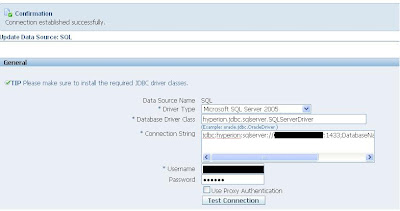
Hyperion driver to connect to MS Sql server.

Image
Using Hyperion driver to connect to Microsoft SQL server's for BI Publisher. Database Types like Microsoft SQL Server 2000 or Microsoft SQL Server 2005 Connection String = jdbc:hyperion:sqlserver://SERVERNAME:PORT;DatabaseName=DBNAME; Driver class = hyperion.jdbc.sqlserver.SQLServerDriver Once you click test connect , there you go!... Note : Microsoft SQL Server should be set up with mixed mode authentication.

Pipelined functions in BIP

http://forums.oracle.com/forums/thread.jspa?messageID=2820319&#2820319 Wanted to use the pl/sql package in datatemplate ? Yes, we can use them in different ways, by using the oracle table function or Pipelined Table Functions. Pl/sql package will return the collection variable , which you can cast it as table in the query.. sample create type numset_t as table of number; / create function f1(x number) return numset_t pipelined is begin for i in 1..x loop pipe row(i); end loop; return; end; / select * from table(f1(3)); COLUMN_VALUE 1 2 3 In the datatemplate , you can just call the select * from table(f1(3)); Or even the parameter can be passed to the function, in which your entire logic can be written, which will return the collection variable. Datatemplate wil be more powerful , when used like this,

Barcode , MICR font in BIP

It seems there is difficulty in making the barcode or MIRC font to be printed in the Report using BIP from concurrent program for Ebiz. Basic idea is , these are nothing but a specialised font, the system should recognize them and display it.. 1. Font should eb installed in the server 2. mapped in the BIP 3.Used in the Report Template. here are few links which throws lights on how to do it. This pdf should help you http://blogs.oracle.com/xmlpublisher/files/BarcodePrinting.pdf . http://blogs.oracle.com/mte1521/mt-search.cgi?tag=barcodes&blog_id=63 http://blogs.oracle.com/xmlpublisher/2008/09/barcoding_again.html http://blogs.oracle.com/xmlpublisher/2006/06/how_to_install_a_font_using_xm.html http://blogs.oracle.com/xmlpublisher/templates/templates_rtf/barcoding/

Multiple columns

Image
How do you get multiple columns ? Use Position () and Mod function and identify the which columns , the data has to be displayed.

Dynamic Column

Image
Dynamically create the column based on the no of element in the XML. Here is the sample of, how 2 do that. 1. first table contains, DATA as parent node, which contains 6 columns , so in the o/p we get 6 dynamic columns 2. in the second table, the THREECOLUMNDATA node contains, 3 elements, so is the output too   Winrichman.blogspot.com

How to set dynamic color , based on xml element

Image
The requirement is, based on certain conditions, a cell will be shown in a specific color. The color would be based on an XML element. The xml element will have values like '#FF00FF' etc.. How to use this value and format the cell ? <xsl:attribute xdofo:ctx="block"name="color"><xsl:value-of select="COLORELEMENT" /></xsl:attribute> where COLORELEMENT is the xml element. what are the other formatting can be used ?? All XSL formatting can be used like this few samples are <xsl:attribute xdofo:ctx="block" name="background-image">Image.gif </xsl:attribute> <xsl:attribute xdofo:ctx="block" name="background-position-horizontal">center</xsl:attribute> <xsl:attribute xdofo:ctx="block" name="background-position-vertical">bottom</xsl:attribute> <xsl:attribute xdofo:ctx="block" name="number-columns-spanned">2</xsl:attri...

How to set dynamic color , based on xml element

Crosstab with multiple repeating columns

Image
How to create a crosstab with two repeating columns.? Here i have taken a multiple column dynamic generation The loop has to be on both of these columns, so that the vlaues are displayed for each date ;)

Repeat Table Header in all pages in BIP

how to repeat the column titles on a table in all pages if the table extends over several pages What you need to is: 1. Select and Highlight the table header row 2. Right click and select table properties 3. On the Row tab properties , specify that the header row should be repeated on every page 4. Save the RTF 5. BIP looks at the properties of the word settings for the table and will repeat the header row on every page the table needs. This works so well in PDF output, but RTF output seeems to have some issue with this header repeat functionality We all can beleive, In future releases this bug won't be there ;)

Slice Label in Pie chart

Image
How to get the percentage, value or text in the pie chart slice label. use the following SliceLabel textType="LD_TEXT_PERCENT" textType takes the following value, (LD_VALUE | LD_PERCENT | LD_TEXT | LD_TEXT_PERCENT) Unfortunaltely, we cannot get he value and percentage both , as its not being supported by Oracle BIBEAN libraries

How can I find the BIP version from output ?

In order to identify the version from the generated PDF output. In the generated PDF output from Publisher and go File->Document Property menu. PDF producer tells the XML Publisher version used to generate the report.

How to get xml file out from Concurrent PGM

People normally remove the attached template and change the output format of Concurrent Pgm back to XML , then run the Pgm and get the XML out. But it is not required. How to get the XML from a BIP based concurrent request/report: a. View->Requests b. Click on Diagnostics button c. View XML If you are interested in the physical file in Server. Actually XML file is stored in UNIX box @ $APPLCSF/$APPLOUT/o{REQUEST_ID}.out What about the output file format naming convention. Naming convention of the output would be as follows and it resides in the following path The output is $APPLCSF/$APPLOUT/{REPORT_NAME}_{REQUEST_ID}_{COUNT}.[PDF|RTF|EXCEL|HTML] Unfortunately, there is no option , right now atleast in BIP CC Pgm integration to customize the output names, reason , to trace back , they need to follow some standard this way. Tables involved in the CC integration & output ==> FND_CONC_REQ_OUTPUTS In future there might something , which facilitate to change this. Suggestion ,how i...

Graph Chart DataMarker

Image
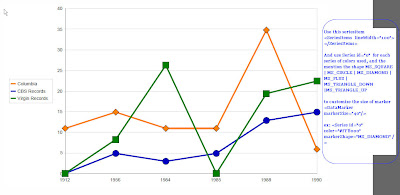
How to enable the marker in chart ? Especially like the one below ? Xsl code for the chart has to be edited little bit, to make it visible, of course right now the BIP plugin , doesn't have this option in the front-end. But in future , independent release , this is going to be there , like as it is in other reporting tools ;) like Oracle Reports... Use this seriesitem <SeriesItems lineWidth="100"> </SeriesItems> And use Series id="0" for each series of colors used, and the mention the shape MS_SQUARE | MS_CIRCLE | MS_DIAMOND | MS_PLUS | MS_TRIANGLE_DOWN |MS_TRIANGLE_UP to customize the size of marker <DataMarker markerSize="40"/> </p> I used it as follows <SeriesItems lineWidth="100"> <Series id="0" color="#FF8000" markerShape="MS_DIAMOND" /> <Series id="1" color="#0000C0" markerShape="MS_CIRCLE" /> <Series id="2" color=...

Column Spanning

Image
I saw a request , Column span BIP forum on how to column span, though Tim has his own blog post to explain this Tim's Post , Xplanation It seems causing some confusion, on how to do it, Its an attribute to be used in the column we wanted to span, [ xsl:attribute xdofo:ctx="block" name="number-columns-spanned"] 3 [xsl:attribute ]

How to get the logged in user , OBIEE

How to get the user logged in OBIEE. Question from BIP forum Shashi was asking for , how to get the username, so that, he can use them in the LOV query to filter based on user logged in. I guess, there are many ways to acheive it, using the NQ_SESSION, and alos using the $SYSUSER.username variables. But, he just needs the username to be used in the query. Here it is. Select :xdo_user_name from dual, returns the username. Ex: usage Select dept from table where user_name = :xdo_user_name