Posts

Showing posts with the label BIP

Apply number locale dynamically

Image
Number format in Bi Publisher. If i have a requirement to display different locale number format in same report, how am i supposed to do it. Probably, the locale will be available in the xml itself, How do i use that display the number format for that locale correctly as needed. Oracle has provided with number formatting function, i already have discussed few of them before. There was a question about this in the forum. Here is the real example of how to do it.
Excel Number

Image
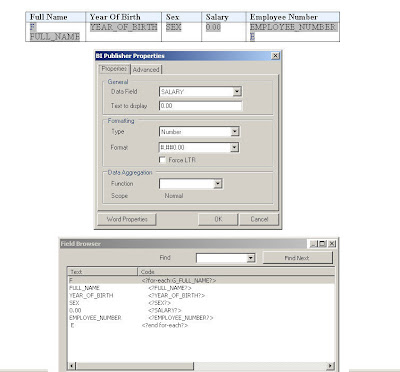
How do i make the excel sum work on the XLS output obtained from BI Publisher ? You have make use of the template better. 1. Do select the form-field by double clicking it 1.1. A property window will pop-up 2. Choose the number as the datatype for the field 3. Choose the Number format, you want to see as number. Note: by default every other field could be String or Regular text. Here is the small samples for it.

Text-Indent

Image
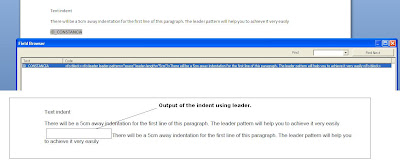
How do you do text-indent dynamically ? here is the sample

Hyperlink

Image
How do you enable the hyperlink based on the element in XML ? Hi Francisco, Note: your xml should only have <URL>http://dbxserver.dbxprts.com:7778/pls/apex/f?p=134:1:::NO::P1_ID_CONSTANCIA:1183</URL> Show me your sample XML , i can help you. What is your expected output ? PDF or HTML ? here it is. option1: If the XML data includes an element that contains a hyperlink , then you can use that element to create dynamic hyperlinks at runtime. a. insert hyperlink from word menu b. In the Type the file or Web page name field of the Insert Hyperlink dialog box, enter the following syntax: c. {ELEMENT_NAME_WHICH_HAS_URL_LINK} where ELEMENT_NAME_WHICH_HAS_URL_LINK is the xml data element name option2: create a form field, you can add it <fo:basic-link external-destination="http://www.google..com"> <fo:inline text-decoration="underline">google Link</fo:inline> </fo:basic-link> or <fo:basic-link external-destination="{ELEMENT_NAME...

Custom Scalefactor

By default the Y or X -axis scale in my graph reads as 0K, 20K, 40K... How to modify the scale to read 10000, 20000... or in some other custom formats? <Y1Axis> <ViewFormat scaleFactorUsed="true" scaleFactor="SCALEFACTOR_NONE" /> </Y1Axis> Attribute scale factor can take one of the following values. SCALEFACTOR_THOUSANDS | SCALEFACTOR_MILLIONS | SCALEFACTOR_BILLIONS | SCALEFACTOR_TRILLIONS | SCALEFACTOR_QUADRILLIONS

Power of Inlines

Image
How to add the looping element in same line - horizontally ? use @inlines command,in conjunction with for-each. Here is the sample on how to do.

BIP Log - enable debug

You can enable the log. Go to JDK/jre/lib directory. 1. Create a file named xdodebug.cfg file with the following content: LogLevel=STATEMENT LogDir=[full path]/temp 2. Restart the BIP server. In the above temp folder xdo.log file will be created, you can get all info there Once your debugging is done, remove the file or rename the file to something else and restart the server. There are some enhancements above this in latest releases. if you cannot do the above steps for some reason, then we can go for those steps.

BIP Documentation

1. go through some of the samples provided in the desktop version. 2. Link 1 3. Link 2 4. Link 3 5. Clustering Link 4 6. Link 5 7. Link 6 8. ebiz Link 7 9. Functions Link 8 10. Offical Forums which can show the light, when it is dark 11. Datatemplate 11. Func Samples

Clustering

http://www.oracle.com/technology/products/xml-publisher/docs/BIP_HA.pdf http://m-button.blogspot.com/2009/04/how-to-create-distributed-weblogic.html

Configure Concurrent Reports to be run

In BI Publisher Standalone, How many concurrent reports can be run ? By default, it is set to 3. in-order to change it to 'N'. following change is required. 1. Go to Admin/Scheduler/quartz-config.properties 2. identify the line org.quartz.threadPool.threadCount=N 3. Change this to N, in order to concurrent no of reports to be run at a time.

No data found

Image
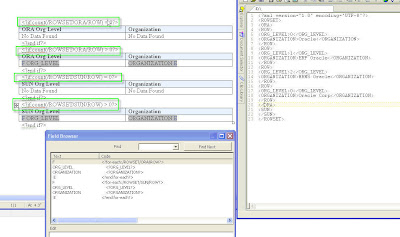
No data found, dynamically based on the data in xml. here is the sample , if you have row, show the data in table. use count() function to identify whether the row exists or not. I just used this this function, but you can very well use any expression to evaluate this condition to be true.

Crosstab issue

Image
http://forums.oracle.com/forums/thread.jspa?messageID=3344649 In order to get the all months,the for-each should have been put on the whole xml, rather than , the current group. the current group might be missing some month value in the xml.

Chart : Different color based on cell value

Image
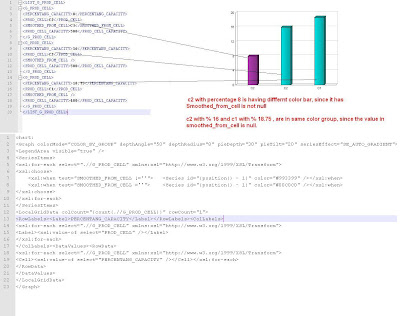
http://forums.oracle.com/forums/thread.jspa?messageID=3343920 http://forums.oracle.com/forums/thread.jspa?threadID=871513 This is little tricky, but do able.

Count element name like ?

<ROWSET> <ROW> <first_name>Y</first_name> <AAA_DIFF_FLG>N</AAA_DIFF_FLG> <BBB_DIFF_FLG>Y</BBB_DIFF_FLG> <CCC_DIFF_FLG>Y</CCC_DIFF_FLG> </ROW> <ROW> <first_name>Y</first_name> <AAA_DIFF_FLG>Y</AAA_DIFF_FLG> <BBB_DIFF_FLG>N</BBB_DIFF_FLG> <CCC_DIFF_FLG>N</CCC_DIFF_FLG> </ROW> </ROWSET> count the element name like 'DIFF_FLG' with the value ='Y'. Ooops, Looks so simple, but was not able to do in 1o mins. was struggling to get this today evening, thought will crack it tomorrow morning. Didn;t get enough peace in mind, when i had my dinner. cracked it in few mins :) when i was having my cup of milk in the night. <?for-each:/ROWSET/ROW?> cccccccc<?count(.//*[(name(.)=’CCC_DIFF_FLG’ or name(.)=’AAA_DIFF_FLG’ or name(.)=’BBB_DIFF_FLG’ ) and .=’Y’])?> TTTTTc<?count(.//*[(substring-after(name(.),’_DIF’)=’F_FLG’ ) and .=’Y’])?> -----...

Barcode , MICR font in BIP

It seems there is difficulty in making the barcode or MIRC font to be printed in the Report using BIP from concurrent program for Ebiz. Basic idea is , these are nothing but a specialised font, the system should recognize them and display it.. 1. Font should eb installed in the server 2. mapped in the BIP 3.Used in the Report Template. here are few links which throws lights on how to do it. This pdf should help you http://blogs.oracle.com/xmlpublisher/files/BarcodePrinting.pdf . http://blogs.oracle.com/mte1521/mt-search.cgi?tag=barcodes&blog_id=63 http://blogs.oracle.com/xmlpublisher/2008/09/barcoding_again.html http://blogs.oracle.com/xmlpublisher/2006/06/how_to_install_a_font_using_xm.html http://blogs.oracle.com/xmlpublisher/templates/templates_rtf/barcoding/

Multiple columns

Image
How do you get multiple columns ? Use Position () and Mod function and identify the which columns , the data has to be displayed.

Dynamic Column

Image
Dynamically create the column based on the no of element in the XML. Here is the sample of, how 2 do that. 1. first table contains, DATA as parent node, which contains 6 columns , so in the o/p we get 6 dynamic columns 2. in the second table, the THREECOLUMNDATA node contains, 3 elements, so is the output too   Winrichman.blogspot.com

How to set dynamic color , based on xml element

Image
The requirement is, based on certain conditions, a cell will be shown in a specific color. The color would be based on an XML element. The xml element will have values like '#FF00FF' etc.. How to use this value and format the cell ? <xsl:attribute xdofo:ctx="block"name="color"><xsl:value-of select="COLORELEMENT" /></xsl:attribute> where COLORELEMENT is the xml element. what are the other formatting can be used ?? All XSL formatting can be used like this few samples are <xsl:attribute xdofo:ctx="block" name="background-image">Image.gif </xsl:attribute> <xsl:attribute xdofo:ctx="block" name="background-position-horizontal">center</xsl:attribute> <xsl:attribute xdofo:ctx="block" name="background-position-vertical">bottom</xsl:attribute> <xsl:attribute xdofo:ctx="block" name="number-columns-spanned">2</xsl:attri...

How to set dynamic color , based on xml element

Crosstab with multiple repeating columns

Image
How to create a crosstab with two repeating columns.? Here i have taken a multiple column dynamic generation The loop has to be on both of these columns, so that the vlaues are displayed for each date ;)